How to unlock a vape device with a child lock is a safety question, not merely a button sequence. Different devices use different systems, including timed button presses, touchscreen controls, or companion-app settings. A method that works on one model may activate another device, reset its settings, or create a safety concern. That uncertainty matters.
Dr. Brian King, director of the FDA’s Center for Tobacco Products, has stated, “There is no safe tobacco product.” His warning does not specifically explain child-lock controls, but it reinforces the need for careful handling. This guide will focus on authorized instructions from manufacturers, clear device identification, and safe troubleshooting. It will not recommend forcing a lock, modifying firmware, or bypassing protective features.
Before attempting anything, users should check the model name, battery condition, and original manual. Keep the device away from children, pets, heat, and loose metal objects. If the screen shows an unfamiliar symbol, the device becomes hot, or the buttons respond unpredictably, stop using it. Put it on a nonflammable surface and contact the manufacturer.
Some advice online sounds confident but lacks evidence. That is a weakness worth acknowledging. Even official instructions can differ between regional versions or newer firmware. The safest approach is simple: confirm the exact model, follow its documented unlocking sequence, and ask authorized support when instructions remain unclear. A child lock should protect people, not become an excuse for risky experimentation.
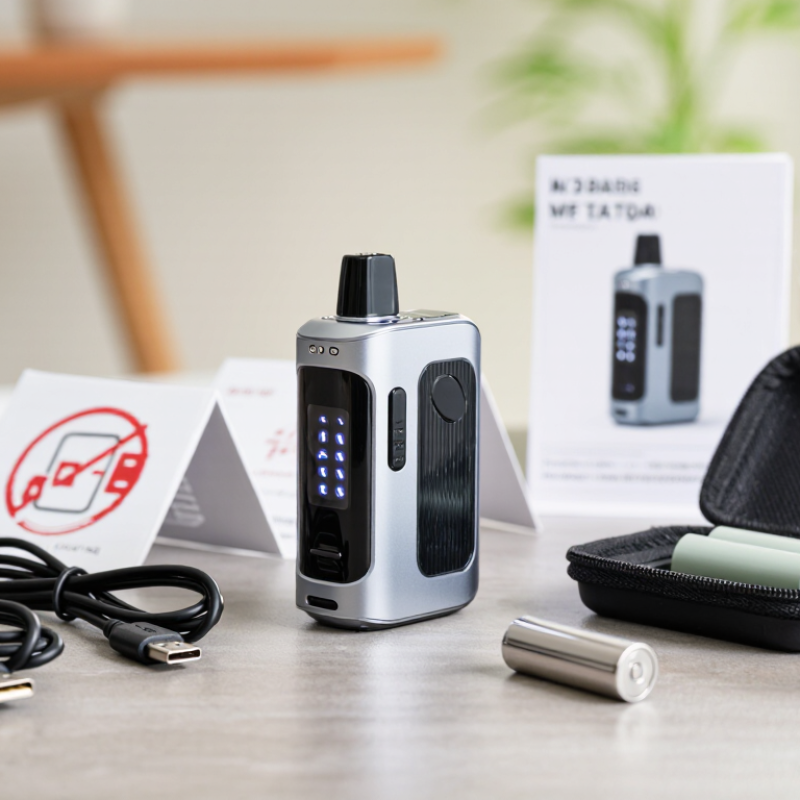
Identify the vape device before attempting any unlock procedure. Check its shape, screen, button layout, charging port, and model label. Some devices use a five-click power lock, while others require a longer button press or a menu setting. A few use a child-resistant cap instead. These systems are not interchangeable. Do not guess.
Read the user manual or the manufacturer’s official safety page. Confirm whether the lock blocks firing, charging, or both. Keep the device away from children during inspection. The U.S. Food and Drug Administration advises storing vaping products securely and protecting children from liquid exposure. This matters because the 2024 National Youth Tobacco Survey recorded about 1.63 million U.S. middle and high school students who currently used e-cigarettes, according to the Centers for Disease Control and Prevention.
Inspect the battery area for swelling, heat, leakage, or a damaged casing. Stop immediately if you notice any of these signs. Never force a button, pierce a cap, or remove a safety component. Electrical safety standard UL 8139 addresses the safety of electronic products used for vaping, but compliance does not make a damaged device safe. A practical mistake is assuming every lock follows the familiar five-click pattern. It does not. If the model cannot be identified, contact qualified support or recycle the device through an approved collection program. Safety information can be incomplete, and manuals may use unclear wording. Take that uncertainty seriously.
How to Unlock a Vape Device With a Child Lock?
Check the manufacturer’s instructions before unlocking. Child-lock systems differ between devices. Some require a button sequence, while others need an approved mobile application. Confirm the exact model first. Check the lock symbol, battery level, and power status. Follow only the documented steps. Do not insert tools, heat the device, or try random button combinations. These actions can damage the battery or activate the heating element unexpectedly. If the manual is missing, contact the manufacturer’s official support channel. Some instructions are vague. That is a design weakness, not a reason to experiment.
Child locks matter because vaping devices must stay away from children. The 2024 National Youth Tobacco Survey, published by the CDC and FDA, estimated that 1.63 million U.S. students currently used e-cigarettes. The report also recorded frequent use among many respondents. This data supports careful storage and controlled access. A locked device should remain locked when not needed. Never leave it beside chargers, keys, or loose batteries.
Tips: Unlock it in a clear, dry area. Keep the manual nearby. Store the device high and out of sight. Inspect the casing before use. Stop immediately if it becomes hot, leaks, smells unusual, or behaves differently. If the official instructions conflict with the device’s condition, do not continue. Contact qualified support instead.
| Data Dimension | Typical Information | What to Check | Safety Note |
|---|---|---|---|
| Lock indicator | A lock icon, flashing light, “LOC” message, or a disabled firing button may indicate that the device is locked. | Read the display and observe the indicator light before trying any control sequence. | Do not assume every symbol has the same meaning across devices. |
| Manufacturer instructions | The correct unlocking method is model-specific and should be listed in the user manual or official support material. | Use the exact model name or number when locating the instructions. | Avoid unofficial instructions that recommend bypassing built-in safety features. |
| Common control pattern | Some devices use a button sequence, such as several quick presses, while others use a screen menu or a dedicated lock control. | Confirm the required number of presses, timing, and button described for the specific model. | Do not repeatedly guess sequences, as controls differ and may activate the device. |
| Power status | The device may need to be powered on, or in some cases powered off, before the lock command works. | Check the manual for the required power state and wait for the screen or light to respond. | Keep the airflow clear and do not press the activation control while troubleshooting. |
| Battery condition | A low battery can prevent buttons, displays, or electronic locks from responding normally. | Check the battery indicator and use only the charging method specified for the device. | Stop using the device if it becomes unusually hot, swollen, damaged, or smells abnormal. |
| Unlock confirmation | A changed icon, confirmation message, or different indicator pattern may show that the lock state has changed. | Verify the status exactly as described in the manual before normal use. | If the status is unclear, leave the device unused and seek model-specific support. |
| Failed unlock attempts | The device may have a different lock function, a damaged control, a depleted battery, or a fault. | Review the official troubleshooting section and check for visible damage or liquid contamination. | Do not open, modify, short-circuit, or force the device. |
| Child-safety storage | Vape devices and e-liquids should be kept inaccessible to children and pets. | Use a secure, high location or locked storage area and keep e-liquid containers closed. | Nicotine-containing liquid can be harmful if swallowed or absorbed through the skin. |
| When to stop | Stop if the device activates unexpectedly, leaks, overheats, shows damage, or behaves unpredictably. | Disconnect it from charging, place it on a non-flammable surface, and follow local disposal or support guidance. | Never continue using a damaged or malfunctioning battery-powered device. |
Important: Child-lock procedures vary by model. Always check the device’s manufacturer instructions before unlocking, and never bypass a safety feature or leave the device accessible to children.
A child lock prevents accidental activation, but the unlocking sequence differs by device. Start with the device switched off and away from your face. Many models use five quick presses on the power button. Others require three presses, a long press, or a screen swipe. Watch for a small lock icon, vibration, or a brief display message. Do not press repeatedly without checking the manual.
The U.S. Food and Drug Administration advises keeping vaping devices and liquid products away from children. This matters because nicotine exposure can cause serious harm. The 2023 National Youth Tobacco Survey reported that about 2.1 million U.S. middle and high school students used e-cigarettes. A working child lock adds protection, but it cannot replace secure storage.
If the first sequence fails, pause. Confirm the battery has power, then review the device’s official instructions. Some screens require a specific gesture, such as swiping upward while holding the main button. Avoid opening the casing, changing wiring, or using unofficial software. Those actions may disable safety controls and create heat or battery risks. I would not assume every three-click system works the same way. A careful check is slower, but safer. If the lock remains active, stop using the device and contact qualified technical support.
Unlocking a vape device with a child lock should begin with the official user manual. Do not force the button, insert tools, or repeatedly guess the activation pattern. Most devices use a controlled button sequence, a screen symbol, or a settings option. After unlocking, check for a clear lock icon change. The device should respond normally, without unexpected heating, buzzing, or flashing.
Test it without inhaling first. Press the control briefly and observe the display, airflow, and indicator light. Stop immediately if the device activates by itself, feels unusually hot, smells burnt, or shows a battery warning. Keep the mouthpiece clean and confirm that the battery compartment is closed firmly. A child lock reduces accidental activation, but it does not replace responsible storage.
This matters because battery failures can cause serious injuries. The U.S. Fire Administration recorded 195 electronic-cigarette fire or explosion incidents from 2009 to 2016, including 133 acute injuries. Its report highlights charging, damaged batteries, and device faults as important risks. UL 8139 also emphasizes battery, charging, and system safety for these products. The evidence is older, but the warning remains relevant. I would still recheck the manual, because unlocking methods and safety indicators vary. Store the device powered off, away from children, pets, heat, and loose metal objects. Never use a damaged device.
Unlocking a vape device with a child lock should never mean bypassing its safety feature. Check the official user manual for the intended button sequence or screen setting. Keep the device powered off while handling it. Do not force the lock, open the casing, or use improvised tools. If the instructions are missing, contact the manufacturer’s support service instead of guessing.
Relock the device immediately after checking it. Store it in a locked drawer or container, away from children and pets. Keep it upright, dry, and away from sunlight, radiators, and car interiors. Store charging cables separately, and inspect the device for cracks, swelling, leaks, or unusual heat. The FDA advises keeping electronic nicotine products and liquid nicotine out of children’s reach. This matters because the CDC’s 2023 National Youth Tobacco Survey recorded about 2.13 million U.S. middle and high school students using e-cigarettes. A lock is useful, but it is not a complete storage plan.
Tips: Create one fixed storage place. Relock it every time. Avoid leaving it on a bedside table, kitchen counter, or in a bag. Wash your hands after handling leaked liquid, and seek urgent medical advice if a child may have swallowed or contacted it. I once underestimated how quickly a child could find an unattended device. That assumption was wrong. Regularly check the lock and storage routine, because small lapses can defeat good safety habits.
Use the device’s documented child-lock control only. After use, relock the device and store it away from children.
The chart summarizes common poison-prevention precautions: secure access, safe e-liquid handling, suitable storage, and responsible disposal. These are precaution categories rather than measured risk percentages. Never bypass or disable a built-in safety feature.
Check the device shape, screen, buttons, charging port, and model label. Read the official manual before pressing anything. Do not guess.
No. Some use five quick button presses. Others use three presses, a long press, or a screen gesture. These methods are not interchangeable.
Keep it switched off and away from your face. Inspect the battery area for swelling, heat, leakage, or casing damage. Stop immediately if you notice problems.
Look for a lock icon, vibration, or a short screen message. If nothing appears, pause and check the instructions. Repeated pressing may create confusion.
Confirm the battery has power. Review the official instructions carefully. If the lock remains active, contact qualified technical support. Avoid unofficial software.
No. Never force buttons, pierce a cap, change wiring, or remove safety components. These actions may increase heat and battery risks. Leave the device closed.
Relock it immediately and place it in a locked drawer or container. Keep it upright, dry, and away from children, pets, sunlight, and radiators.
Stop using it and avoid further handling. Keep children away from the area. Follow local guidance for safe disposal or contact qualified support.
No. Secure storage remains necessary. Keep charging cables separate and avoid bedside tables, kitchen counters, cars, and open bags. I once underestimated this risk. That assumption was wrong.
How to unlock a vape device with a child lock depends on the device’s design, so begin by identifying whether it uses physical buttons, a touchscreen, or a combination of controls. Before trying anything, check the manufacturer’s instructions for the correct unlocking method and make sure the device is switched off or safely handled. Common systems may require a specific button sequence, several rapid presses, or a short touch-and-hold action, but the exact steps can vary. Avoid guessing, forcing buttons, or using tools, as this could damage the device or create a safety risk.
After following the approved sequence, confirm that the lock indicator has disappeared and that the device responds normally without overheating, leaking, or showing warning messages. If it does not unlock, stop and consult the official support information. Once finished, re-enable the child lock and store the device and any related materials in a secure, dry location away from children and anyone who should not access it.

Nano Vape